
PHPMailer is a PHP library that has an inbuilt function to send emails safely and easily using PHP from the server.
Mail is a useful functionality on the website.
It is used for user verification, forgot password, sending information, etc.
In this tutorial, I show how you send emails using server SMTP with PHPmailer in PHP.

Contents
1. PHPMailer
- Using the composer to add PHPMailer to the project.
- Navigate to your project directory and execute the following command –
composer require phpmailer/phpmailer
- It will install and create an
autoload.phpfile in thevendordirectory.
2. Get SMTP Details
- Login to your server using cPanel.
- Navigate to Email Accounts.
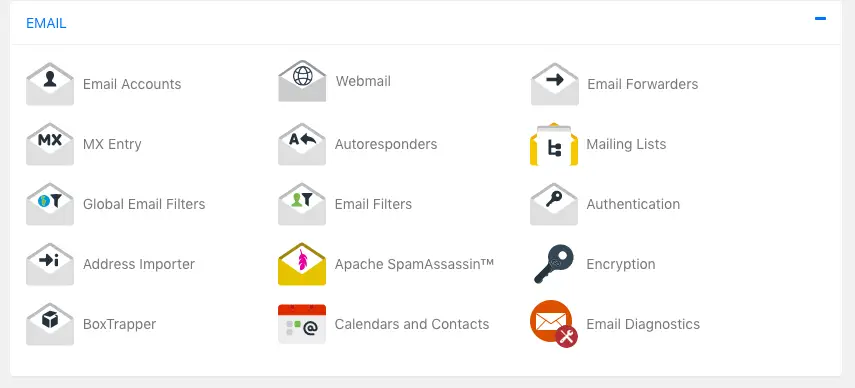
- Create a new email from which you want to send Email if not exist. Click on the
Set Up Mail Client.
NOTE – It may differ according to the server.

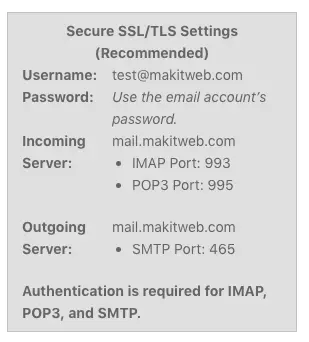
- Scroll the page on the left side SMTP details are available.
- Username, password, Outgoing host is been used for PHPMailer configuration. Using 587 port instead of 465.
3. PHP
Import PHPMailer, Exception class and include 'vendor/autoload.php'.
<?php

use PHPMailer\PHPMailer\PHPMailer;
use PHPMailer\PHPMailer\Exception;

// Load Composer's autoloader
require 'vendor/autoload.php';
Create an object of PHPMailer.
// Instantiation and passing `true` enables exceptions
$mail = new PHPMailer(true);
Assign 0 to $mail->SMTPDebug to disable debugging. To enable pass 2.
$mail->SMTPDebug = 0; // 0 - Disable Debugging, 2 - Responses received from the server
Specify server host in $mail->Host, username in $mail->Username, and password in $mail->Password. Assign 'tls' in $mail->SMTPSecure and 587 to $mail->Port.
NOTE – All this value get from previous step.
$mail->Host = 'mail.makitweb.com'; // Specify main and backup SMTP servers
$mail->SMTPAuth = true; // Enable SMTP authentication
$mail->Username = 'test@makitweb.com'; // SMTP username
$mail->Password = 'password'; // SMTP password
$mail->SMTPSecure = 'tls';//PHPMailer::ENCRYPTION_STARTTLS; Enable TLS encryption, `PHPMailer::ENCRYPTION_SMTPS` also accepted
$mail->Port = 587; // TCP port to connect to
Specify sender email-id and name in $mail->setFrom() and recipient email-id and name in $mail->addAddress().
$mail->setFrom('test@makitweb.com', 'Yogesh singh');
$mail->addAddress('Recipient email-id', 'Recipient name'); // Add a recipient
Specify mail subject, and body in $mail->Subject, $mail->Body, and $mail->AltBody.
$mail->isHTML(true); // Set email format to HTML
$mail->Subject = 'Send email using SMTP with PHPmailer';
$mail->Body = 'A test email from <a href="https://makitweb.com">maktiweb.com</a>';
$mail->AltBody = 'A test email from makitweb.com'; // Plain text for non-HTML mail clients
Attach file using $mail->addAttachment() method. You can specify the file name using the 2nd parameter.
$mail->addAttachment('upload/file.pdf');
$mail->addAttachment('upload/image.png', 'image 1'); // Optional name
Call $mail->send() to send a request.
Completed Code
<?php

// Import PHPMailer classes into the global namespace
// These must be at the top of your script, not inside a function
use PHPMailer\PHPMailer\PHPMailer;
use PHPMailer\PHPMailer\Exception;

// Load Composer's autoloader
require 'vendor/autoload.php';

// Instantiation and passing `true` enables exceptions
$mail = new PHPMailer(true);

try {
   //Server settings
   $mail->SMTPDebug = 0; // 0 - Disable Debugging, 2 - Responses received from the server
   $mail->isSMTP(); // Set mailer to use SMTP
   $mail->Host = 'mail.makitweb.com'; // Specify main and backup SMTP servers
   $mail->SMTPAuth = true; // Enable SMTP authentication
   $mail->Username = 'test@makitweb.com'; // SMTP username
   $mail->Password = 'password'; // SMTP password
   $mail->SMTPSecure = 'tls';//PHPMailer::ENCRYPTION_STARTTLS; Enable TLS encryption, `PHPMailer::ENCRYPTION_SMTPS` also accepted
   $mail->Port = 587; // TCP port to connect to

   //Recipients
   $mail->setFrom('test@makitweb.com', 'Yogesh singh');
   $mail->addAddress('Recipient email-id', 'Recipient name'); // Add a recipient

   // Content
   $mail->isHTML(true); // Set email format to HTML
   $mail->Subject = 'Send email using SMTP with PHPmailer';
   $mail->Body = 'A test email from <a href="https://makitweb.com">maktiweb.com</a>';
   $mail->AltBody = 'A test email from makitweb.com'; // Plain text for non-HTML mail clients

   // Attachement
   $mail->addAttachment('upload/file.pdf');
   $mail->addAttachment('upload/image.png', 'image 1');    // Optional name
   $mail->send();
   echo 'Message has been sent';
} catch (Exception $e) {
   echo "Message could not be sent. Mailer Error: {$mail->ErrorInfo}";
}
4. Conclusion
Get the SMTP details from the cPanel if you don’t have one and use it to configure PHPMailer. Enable the debugging by assigning 2 to $mail->SMTPDebug if getting an issue while sending the email.
