
Google reCaptcha is like a security guard for websites. It stops spam and robots from messing with things. It’s commonly used in places like when you log in, sign up, send a message, or leave a comment on a website.
There are two types of Google reCaptcha:
- v2 – You have to pick pictures to answer a question.
- v3 – This one works in the background, and you don’t even see it.
In this guide, I’ll show you how to add Google reCaptcha v2 to your form and make sure everything is secure in your CodeIgniter 4 project.

Table of Content
- Get Google reCAPTCHA keys
- Create variables in .env for storing reCAPTCHA keys
- Enable CSRF
- Create custom validation for reCAPTCHA
- Create Controller – Validate reCAPTCHA
- Create Routes
- Create View
- Output
- Conclusion
1. Get Google reCAPTCHA keys
Feel free to skip this part if you’ve already signed up for Google reCAPTCHA v2 and have your site and secret keys.
If not, follow these steps to register your website for reCAPTCHA:
- Navigate to the following link for registering the website for reCaptcha.
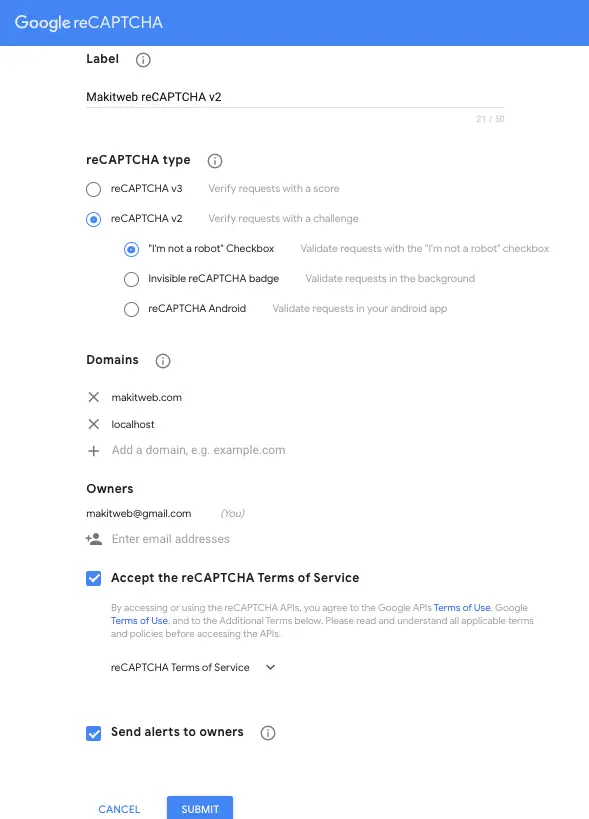
- Following page will display. Here, enter a label, select reCAPTCHA v2 from the reCAPTCHA type, and then “I’m not a robot” Checkbox if not selected. Specify domain names where you want to use and you can also specify localhost if you want to test it on your system.
- Click the Submit button.
- After submitting a new page display that has a site and secret keys.
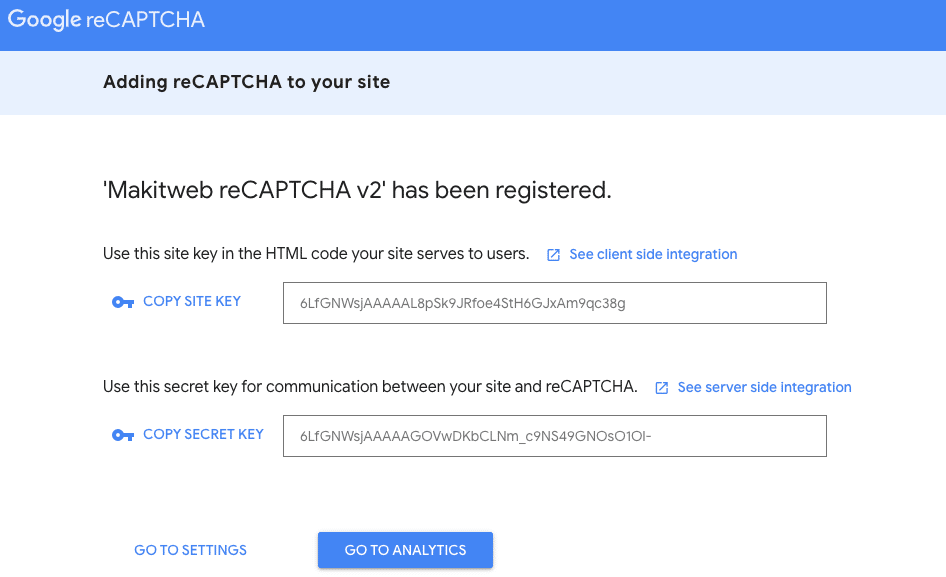
- Copy the keys.
2. Create variables in .env for storing reCAPTCHA keys
- Open
.envfile which is available at the project root.
NOTE – If dot (.) not added at the start then rename the file to .env.
- Here, define 2 variables for storing the captcha site and secret keys –
GOOGLE_RECAPTCHA_SITEKEY = 6LfGNWsjAAAAAL8pSk9JRfoe4StH6GJxAm9qc38g
GOOGLE_RECAPTCHA_SECRETKEY = 6LfGNWsjAAAAAGOVwDKbCLNm_c9NS49GNOsO1Ol-
3. Enable CSRF
- Again open
.envfile. - Remove # from the start of the
security.tokenName,security.headerName,security.cookieName,security.expires,andsecurity.regenerate. - I update the
security.tokenNamevalue with'csrf_hash_name'. With this name read CSRF hash. You can update it with any other value. - If you don’t want to regenerate CSRF hash after each request then set
security.regenerate = false.
security.tokenName = 'csrf_hash_name'
security.headerName = 'X-CSRF-TOKEN'
security.cookieName = 'csrf_cookie_name'
security.expires = 7200
security.regenerate = true
- Open
app/Config/Filters.phpfile. - Uncomment
'csrf'in'before'if commented.
// Always applied before every request
public $globals = [
    'before' => [
         // 'honeypot',
         'csrf',
         // 'invalidchars',
    ],
    'after' => [
        'toolbar',
        // 'honeypot',
        // 'secureheaders',
    ],
];
4. Create custom validation for reCAPTCHA
- Create a new
CaptchaValidation.phpfile inapp/Config/folder. - Create
CaptchaValidationclass and averifyrecaptcha()method. - This method name –
verifyrecaptchause for calling while defining validation in the controller. - Read secret key from
.envand assign to$secretkey. Here,$strhas recaptcha response. - If
$stris not empty then send the request to –
"https://www.google.com/recaptcha/api/siteverify?secret=".$secretkey."&response=".$str."&remoteip=".$_SERVER['REMOTE_ADDR']
for verification. Here, pass $secreteky,$str, and $_SERVER['REMOTE_ADDR'].
- If response is successfully returned then return
trueotherwise, returnfalseand assign error message to$errorvariable.
Completed Code
<?php
namespace Config;

class CaptchaValidation{

    public function verifyrecaptcha(string $str, ?string &$error = null): bool
    {
          $secretkey = getenv('GOOGLE_RECAPTCHA_SECRETKEY');

          if(($str) && !empty($str)) {

                $response = file_get_contents("https://www.google.com/recaptcha/api/siteverify?secret=".$secretkey."&response=".$str."&remoteip=".$_SERVER['REMOTE_ADDR']);

                $responseData = json_decode($response);
                if($responseData->success) { // Verified
                      return true;
                }
          }

          $error = "Invalid captacha";

          return false;
    }

}
Update Validation.php
For using the above-created Validation need to update the Validation.php file.
- Open
app/Config/Validation.phpfile. - Include
Config\CaptchaValidationclass. - Specify
CaptchaValidation::classin$ruleSetsArray.
Completed Code
<?php

namespace Config;

use CodeIgniter\Config\BaseConfig;
use CodeIgniter\Validation\CreditCardRules;
use CodeIgniter\Validation\FileRules;
use CodeIgniter\Validation\FormatRules;
use CodeIgniter\Validation\Rules;
use Config\CaptchaValidation; // Custom reCAPTCHA validation

class Validation extends BaseConfig
{
      // --------------------------------------------------------------------
      // Setup
      // --------------------------------------------------------------------

      /**
      * Stores the classes that contain the
      * rules that are available.
      *
      * @var string[]
      */
      public $ruleSets = [
           Rules::class,
           FormatRules::class,
           FileRules::class,
           CreditCardRules::class,
           CaptchaValidation::class, // Custom reCAPTCHA validation
      ];

      /**
      * Specifies the views that are used to display the
      * errors.
      *
      * @var array<string, string>
      */
      public $templates = [
           'list' => 'CodeIgniter\Validation\Views\list',
           'single' => 'CodeIgniter\Validation\Views\single',
      ];

      // --------------------------------------------------------------------
      // Rules
      // --------------------------------------------------------------------
}
5. Create Controller – Validate reCAPTCHA
- Create
PagesControllerController.
php spark make:controller PagesController
- Create 2 methods –
- index() – Load
indexview. - submitcontactus() – This method calls on form submit.
- index() – Load
Define validation. Here, for g-recaptcha-response specify verifyrecaptcha with required.
If validation is failed then return to the page with the validation response otherwise set SESSION flash message and redirect to route('/').
Completed Code
<?php

namespace App\Controllers;

use App\Controllers\BaseController;

class PagesController extends BaseController{

     public function index(){
          return view('index');
     }

     public function submitcontactus(){

          // Validation
          $input = $this->validate([
               'name' => 'required',
               'email' => 'required',
               'subject' => 'required',
               'message' => 'required',
               'g-recaptcha-response' => 'required|verifyrecaptcha',
            ],[
               'g-recaptcha-response' => [
               'required' => 'Please verify captcha',
            ],
          ]);

          if (!$input) { // Not valid

               $data['validation'] = $this->validator;

               return redirect()->back()->withInput()->with('validation', $this->validator);

          }else{
               // Set Session
               session()->setFlashdata('message', 'Submitted Successfully!');
               session()->setFlashdata('alert-class', 'alert-success');

          }
          return redirect()->route('/');

     }
}
6. Create Routes
- Open
app/Config/Routes.phpfile. - Here, create 2 routes –
- /
- page/submitcontactus – Handle form submit.
$routes->get('/', 'PagesController::index');
$routes->post('page/submitcontactus', 'PagesController::submitcontactus');
7. Create View
- Create
index.phpfile inapp/Views/folder. - Include recaptcha js in
<head >section –
<script src='https://www.google.com/recaptcha/api.js'></script>
- Create a simple contact
<form >. Set action url to<?=site_url('page/submitcontactus')?>. - Add Google reCaptcha container. Here,
<div >hasclass="g-recaptcha"anddata-sitekey="<?= getenv('GOOGLE_RECAPTCHA_SITEKEY') ?>".
<div class="g-recaptcha" data-sitekey="<?= getenv('GOOGLE_RECAPTCHA_SITEKEY') ?>"></div>
Completed Code
<!DOCTYPE html>
<html>
<head>
     <meta charset="utf-8">
     <meta name="viewport" content="width=device-width, initial-scale=1">
     <title>Add Google reCAPTCHA v2 to form in CodeIgniter 4</title>

     <!-- Bootstrap CSS -->
     <link rel="stylesheet" href="https://cdn.jsdelivr.net/npm/bootstrap@5.2.3/dist/css/bootstrap.min.css" >

     <!-- reCAPTCHA JS-->
     <script src='https://www.google.com/recaptcha/api.js'></script>

</head>
<body>

     <div class="container">

         <div class="row">
               <div class="col-md-6 mt-5" style="margin: 0 auto;">

                    <?php
                    // Display Response
                    if(session()->has('message')){
                    ?>
                          <div class="alert <?= session()->getFlashdata('alert-class') ?>">
                                <?= session()->getFlashdata('message') ?>
                          </div>
                    <?php
                    }
                    ?>

                    <h2 class="mb-4">Contact US</h2>

                    <?php $validation = \Config\Services::validation(); ?>

                    <form method="post" action="<?=site_url('page/submitcontactus')?>">

                         <?= csrf_field(); ?>
                         <div class="form-group mb-4">
                               <label class="control-label col-sm-2" for="name">Name:</label>
                               <div class="col-sm-10">
                                     <input type="text" class="form-control" id="name" placeholder="Enter Name" name="name" value="<?= old('name') ?>">
                               </div>

                               <!-- Error -->
                               <?php if( $validation->getError('name') ) {?>
                                      <div class='text-danger mt-2'>
                                           * <?= $validation->getError('name'); ?>
                                      </div>
                               <?php }?>
                         </div>
                         <div class="form-group mb-4">
                               <label class="control-label col-sm-2" for="email">Email:</label>
                               <div class="col-sm-10">
                                      <input type="email" class="form-control" id="email" placeholder="Enter Email" name="email" value="<?= old('email') ?>">
                               </div>

                               <!-- Error -->
                               <?php if( $validation->getError('email') ) {?>
                                      <div class='text-danger mt-2'>
                                            * <?= $validation->getError('email'); ?>
                                      </div>
                               <?php }?>
                         </div>
                         <div class="form-group mb-4">
                               <label class="control-label col-sm-2" for="subject">Subject:</label>
                               <div class="col-sm-10">
                                     <input type="text" class="form-control" id="subject" placeholder="Enter Subject" name="subject" value="<?= old('subject') ?>" >
                               </div>

                               <!-- Error -->
                               <?php if( $validation->getError('subject') ) {?>
                                     <div class='text-danger mt-2'>
                                            * <?= $validation->getError('subject'); ?>
                                     </div>
                               <?php }?>
                         </div>
                         <div class="form-group mb-4">
                               <label class="control-label col-sm-2" for="message">Message:</label>
                               <div class="col-sm-10">
                                     <textarea class="form-control" id="message" name="message"><?= old('message') ?></textarea>
                               </div>

                               <!-- Error -->
                               <?php if( $validation->getError('message') ) {?>
                                     <div class='text-danger mt-2'>
                                           * <?= $validation->getError('message'); ?>
                                     </div>
                               <?php }?>
                         </div>
                         <div class="form-group mb-4">
                               <!-- reCAPTCHA -->
                               <div class="g-recaptcha"
                                    data-sitekey="<?= getenv('GOOGLE_RECAPTCHA_SITEKEY') ?>"
                               ></div>

                               <!-- Error -->
                               <?php if( $validation->getError('g-recaptcha-response') ) {?>
                                     <div class='text-danger mt-2'>
                                            * <?= $validation->getError('g-recaptcha-response'); ?>
                                     </div>
                               <?php }?>

                         </div>
                         <div class="form-group ">
                               <div class="col-sm-offset-2 col-sm-10">
                                     <button type="submit" class="btn btn-info">Submit</button>
                               </div>
                         </div>
                    </form>
               </div>
         </div>

     </div>

</body>
</html>
8. Output
9. Conclusion
Adding Google reCaptcha v2 to your forms in CodeIgniter 4 is a wise choice to make sure your website stays safe. By using this hidden security feature, you’re not just guarding your site from spam and robots but also making it easy for real users to use without any trouble.
Now that you know how to put reCaptcha v2 into your forms, your CodeIgniter 4 project is well-protected from unwanted problems. Keep it safe, keep it simple, and let your users have a spam-free time on your website.
You can also view this tutorial if you want to know Google reCAPTCHA v3 implementation in CodeIgniter 4.
If you found this tutorial helpful then don't forget to share.